
पहली BTC खरीद
Binance Security: Deposit से पहले 2FA Checklist
Binance में पहली deposit से पहले unique password, authenticator या passkey, anti-phishing code और authorized devices की जांच पूरी करें।
पहली बार Binance में पैसे जमा करने से पहले account security पूरी कर लें। न्यूनतम तैयारी यह है: Binance और email के लिए अलग password, authenticator app या passkey, anti-phishing code, और authorized devices की जांच। बाद में अपने wallet में नियमित BTC withdrawal करनी हो, तभी withdrawal address whitelist को समझकर चालू करें।
यह checklist उन लोगों के लिए है जिनका account बन चुका है, लेकिन जिन्होंने अभी deposit नहीं किया। कोई setting account को अजेय नहीं बनाती। कई छोटी सुरक्षा परतें मिलकर यह रोकती हैं कि एक leaked password या एक नकली email पूरी access दे दे।
2FA चालू करना ही पूरी सुरक्षा नहीं है
हर सुरक्षा उपाय अलग समस्या को संभालता है:
- Unique password दूसरे website के data leak से होने वाले credential-stuffing को कम करता है।
- Authenticator या passkey, password के बाद दूसरी verification जोड़ता है।
- Anti-phishing code Binance के नाम से आए संदिग्ध email को पहचानने का एक संकेत देता है।
- Device और account activity में अनजान login जल्दी दिख सकता है।
- Withdrawal whitelist funds को पहले से मंजूर address तक सीमित कर सकती है, लेकिन इसका भरोसा secured email और account पर ही रहता है।
Anti-phishing code सही दिखे, तब भी email के हर link पर भरोसा न करें। Login के लिए अपना saved binance.com bookmark खोलना ज्यादा सुरक्षित आदत है।
पहले अपने login email को सुरक्षित करें
Binance के login alerts, device confirmation और कुछ security actions आपके email से जुड़े होते हैं। यदि email और Binance पर एक ही password है, तो attacker को दो दरवाजों के लिए एक ही चाबी मिल सकती है। Deposit से पहले ये काम पूरे करें:
- Password manager से Binance और email के लिए दो अलग, unique passwords बनाएं।
- Email account पर भी 2FA लगाएं और recovery email या phone नंबर जांचें।
- अनजान forwarding rules, signed-in devices और third-party app access हटाएं।
- Password, OTP, recovery key या screen-sharing access किसी support chat या form में न दें।
Password leak होने का शक हो तो warning email के button से login न करें। Trusted device पर official bookmark खोलें, password बदलें और recent activity देखें।
Authenticator या passkey चुनें
Binance की जून 2026 में अपडेट हुई security guidance में SMS, authenticator apps, hardware security keys और passkeys का उल्लेख है। SMS केवल password से बेहतर है, लेकिन SIM-swap हमले के कारण authenticator app अधिकांश नए users के लिए मजबूत शुरुआती विकल्प है। आपका device और account passkey support करता हो तो वह phishing-resistant login में मदद कर सकता है। उपलब्ध विकल्प region, device और account के अनुसार अलग हो सकते हैं।
Setup करते समय चार बातें न छोड़ें:
- Authenticator की backup या recovery key को offline रखें। Gallery, cloud note या chat में screenshot न छोड़ें।
- नया phone लेने या पुराना phone खोने पर official recovery process कहां मिलेगा, यह पहले समझें।
- OTP केवल उस official page पर डालें जिसे आपने स्वयं खोला और domain जांचा है।
- कोई व्यक्ति remote-control app install करवाए या code बोलने को कहे तो बातचीत रोक दें।
Anti-phishing code का सही उपयोग
Anti-phishing code आपके द्वारा चुना गया छोटा पहचान code है। Binance की official guide के अनुसार इसे Account > Security में बनाया जा सकता है और genuine notification emails में दिखना चाहिए। नीचे Binance Academy के सार्वजनिक security guide का वास्तविक interface example है। Field खाली है और किसी user की निजी जानकारी दिखाई नहीं देती।
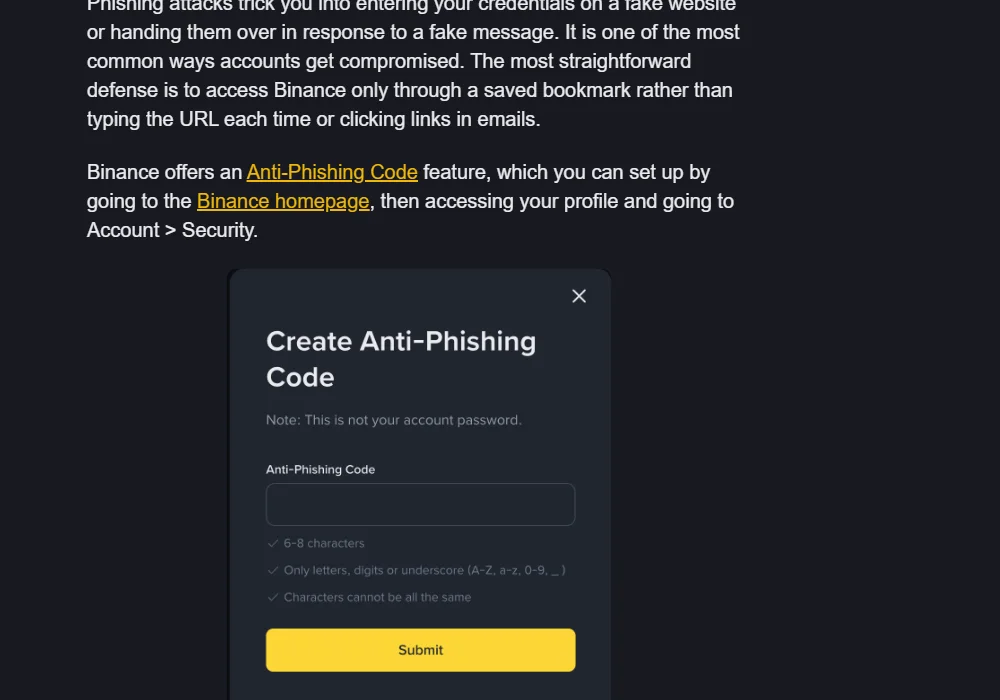
Code बनाते समय Binance password, जन्मतिथि, phone नंबर या public username इस्तेमाल न करें। इसे social media या tutorial screenshot में भी न दिखाएं। Binance के नाम से आए message में code गायब या गलत हो तो उसे संदिग्ध मानें, link न खोलें और official bookmark से account activity जांचें।
यह feature “गलत हो तो रुकें” वाला संकेत है, authenticity की पूर्ण guarantee नहीं। Code leak हो सकता है और phishing page असली website जैसा दिख सकता है। इसलिए domain check, 2FA और private codes को न साझा करना साथ-साथ जरूरी हैं।
Authorized devices और recent activity देखें
Account > Security में Device Management और recent account activity खोलें। Binance की official guidance के अनुसार यहां authorized devices, login IP और timestamp देखे जा सकते हैं। हर entry पर ये सवाल पूछें:
- Device, operating system और browser क्या आपके हैं?
- Login time आपके इस्तेमाल से मेल खाता है?
- बदला हुआ location या IP mobile network, VPN या यात्रा से समझ आता है?
- कोई पुराना, बेचा हुआ या repair में दिया device अभी भी authorized तो नहीं?
अनजान activity दिखे तो deposit रोक दें। Trusted device से official site खोलकर password बदलें, unknown device हटाएं और Binance की official account-security प्रक्रिया देखें। अचानक आए message के कहने पर funds किसी “safe address” पर न भेजें।
Withdrawal whitelist अभी चालू करनी चाहिए?
आपके पास अपना BTC wallet नहीं है या test withdrawal नहीं किया है, तो केवल checklist पूरी करने के लिए कोई address न जोड़ें। Whitelist तब उपयोगी है जब आपका verified receiving address तय हो और आप उसी पर बार-बार भेजते हों।
इसे चालू करने से पहले:
- Email पर अलग password और 2FA हों;
- Address आपके control वाले wallet से आया हो;
- BTC network और receiving wallet का support मेल खाता हो;
- पहले छोटी test withdrawal की योजना हो।
BTC खरीदने के बाद custody तय करनी हो तो Bitcoin को Binance पर रखने या अपने wallet में भेजने की Hindi guide पढ़ें। Whitelist को तुरंत बड़ी withdrawal करने का कारण न बनाएं।
Deposit से पहले 10-minute checklist
- Binance password किसी दूसरी site पर इस्तेमाल नहीं हुआ
- Login email का अलग password और 2FA है
- Authenticator app या passkey enabled है
- Recovery information offline रखी है
- Anti-phishing code बना है और public नहीं किया
- Verified
binance.compage bookmark किया है - Authorized devices और recent activity जांची है
- Unknown login, forwarding rule या app permission नहीं है
- पता है कि genuine support password, OTP या remote access नहीं मांगता
- Withdrawal करनी हो तो अपना address और small-test plan तैयार है
किसी item का जवाब साफ नहीं है तो deposit रोकें और उसी item को official source से दोबारा जांचें। जल्दी करने से कोई लाभ नहीं मिलता।
Security के बाद ही पहली purchase की योजना बनाएं
Account सुरक्षित करने के बाद पहली बार Bitcoin खरीदने की पूरी Hindi checklist से funding, Convert या Spot, order history और BTC balance का क्रम समझें। Test amount तय करते समय Bitcoin की minimum रकम और personal risk budget को अलग रखें। Security settings पूरी होने का अर्थ यह नहीं कि आपको ज्यादा रकम लगानी चाहिए।
यह independent educational guide है, personal investment advice या Binance की official support instruction नहीं। Menu names और उपलब्ध security methods region, device और product update के साथ बदल सकते हैं। किसी action से पहले अपने account में दिखाई दे रही current information जांचें।
Official sources और verification
- Binance Academy: Secure Your Binance Account in 7 Simple Steps
- Binance Academy: What Is Two-Factor Authentication (2FA)?
- Binance Academy: Binance Beginner's Guide
- Binance Academy: What Is Phishing and How Does It Work?
Verification time: 2026-08-19T17:30:08+08:00। इन sources से 2FA, passkey, anti-phishing code, device activity और withdrawal address management के current official descriptions जांचे गए। Actual interface और availability के लिए अपने Binance account की current Security screen को अंतिम source मानें।
अगर सच में खाता खोलना है तो इस लिंक से जाएँ — BN1899 अपने आप भर जाता है। इससे साइट को कमीशन मिल सकता है।